





Overview
We are excited to announce the addition of order functionality to the shopping basket and the ability for manufacturer admins to manage their product catalogue with adding/editing categories and assortments directly in the Digital Sales Assistant Admin Tool.
Features
1. Self Service Product Categories Management
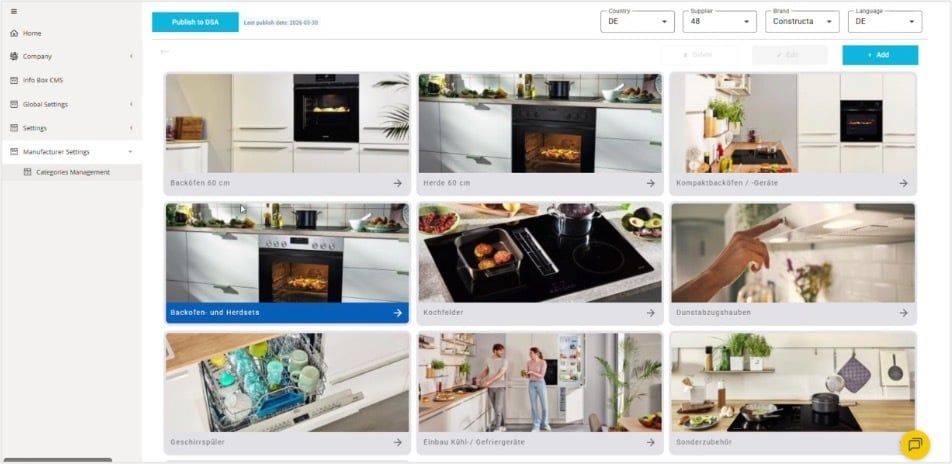
A new "Categories Management" section is now available in the Digital Sales Assistant Admin Tool for Manufacturer Admins enabling them to:
- Create, edit, and delete hierarchical categories (up to 5 levels)
- Upload and update category images
- Manage assortments, including bulk product code uploads via CSV import
- Validate and publish changes with a timestamp
Once published, updates are reflected in the Digital Sales Assistant product catalogue. Role‑based permissions ensure only authorized users can view or edit catalogue data.
Why this matters:
This feature empowers manufacturers to maintain the assortments and levels on their own in a faster way, without the need to send changes or images to us anymore, giving them full control over both assortments and levels.
It also brings a performance improvement to the speed of loading while browsing through the categories in the product catalogue.
2. Order functionality for single branded Shopping Basket
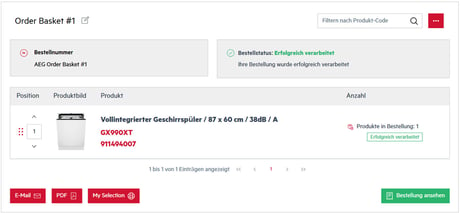
Order functionality has been enabled to the shopping basket pages for AEG/Electrolux in Germany, allowing multiple products of a single brand to be submitted for an order instantly. Orders are confirmed with an Order ID, and status feedback for each product (Success, Warning or Error) is shown in real time.
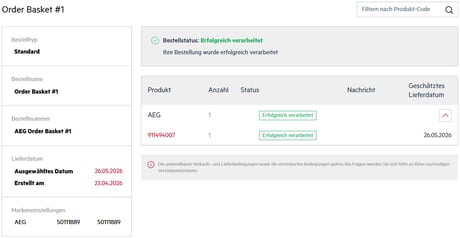 The first response is retrieved from the manufacturers backend and shown in Digital Sales Assistant. The follow up of the order status or even changes (e.g delivery date) and cancelations can be done in the B2B Portal of the respective brand. Key account managers would also be able to support with these cases.
Why this matters:
This feature streamlines ordering for the retailers by eliminating extra steps and external systems, and it ensures Digital Sales Assistant to cover a significant step in the sales journey for the retailer and the customer.
Important notes
- Filters are not covered within the Self Service Product Categories Management feature.
- Order functionality must be activated in Digital Sales Assistant Admin Tool, and necessary role for the ordering function must be given before use.
- Digital Sales Assistant does not send price for information for the orders. Prices are provided by the manufacturer.
- Order functionality will be launched gradually to other countries and brands along with their setup.
These changes will help improve your use of the Digital Sales Assistant. If you have any comments or suggestions for improvement, please do not hesitate to contact us at support@tradeplace.com.
News



Tradelog
-Sep-21-2026-11-25-49-6233-AM.gif)