
This feature simplifies the ordering process for retailers by removing unnecessary steps and reducing reliance on external systems. It also enables Digital Sales Assistant to support an important stage of the sales journey for both the retailer and the customer.
For instructions on how to activate this function for your company, refer to this article: How to enable the Order function in DSA
Please note the following:
- To activate the order functionality, the brand must first enable the Order function at the country level. Once this is confirmed, the Order button activation will become visible in the General Settings. After approval, the appropriate user role must be assigned before the feature can be used.
- Orders can only be placed for single-brand baskets and are currently available only for Digital Sales Assistants in Germany.
- Digital Sales Assistant does not provide price information for orders. Pricing is provided by the manufacturer.
STEP 1
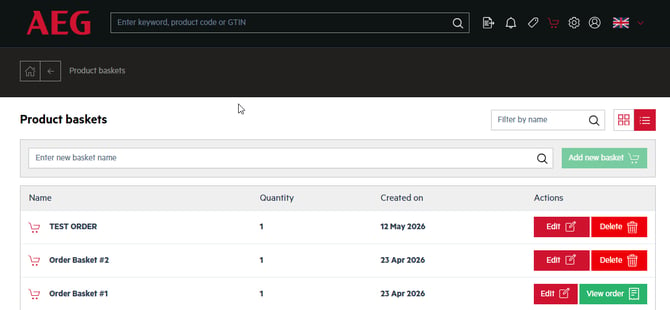
Create a shopping basket and click the Shopping Basket button.
For detailed instructions, see this article: How to create and manage your Shopping Basket in the Digital Sales Assistant?
STEP 2
Click on  to open the basket you want to order.
STEP 3
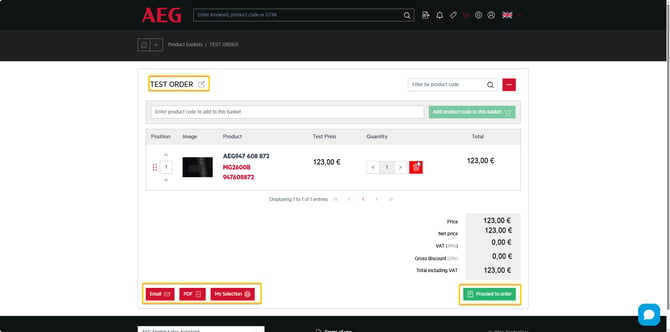
Within the basket, you will see the price breakdown, download options, and the order button.
STEP 4
Click on  . A pop-up window will appear where you can enter the required order information.
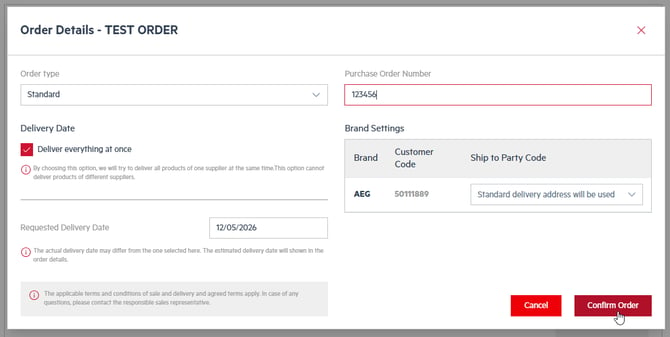
The Ship To Party Code determines the desired shipping address. Please ensure you select the correct code before submitting the order.
If only one code is stored, the standard delivery address defined by the manufacturer will be used automatically, and no Ship To Party Code selection is required.
STEP 5
Click on  to complete the process. Once the order has been placed, it will appear in the Shopping Basket tab.

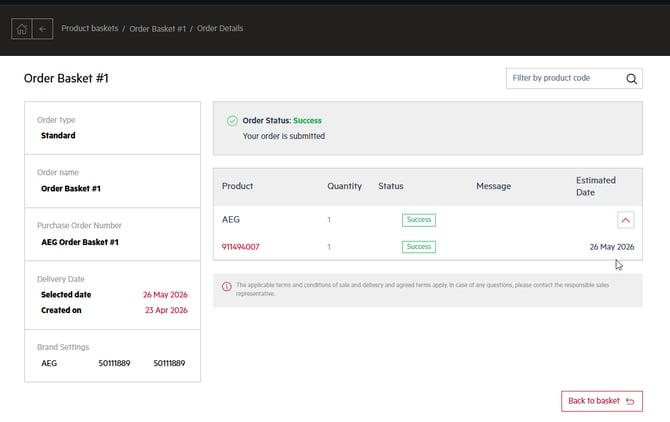
All orders placed in the DSA environment can be tracked and edited via your Portals Hub access. Once an order has been sent, no further changes or basket deletion are possible.
If you are unsure how to access this environment or encounter any issues, please contact support@tradeplace.com.