
Customer-specific prices allow you to export product catalogues that include prices negotiated specifically for your customer account. These prices are retrieved during the export process and are not permanently stored in Content Hub.
Before You Begin
Customer-specific prices are only available when:
-
Pricing information is available from the supplier.
- Your supplier has enabled pricing for your customer code.
- Your export profile includes customer-specific prices.
If any of these conditions are not met, products will still be exported but customer prices may not be included.
How Customer Pricing Works
When you export a catalogue:
- Content Hub generates the product catalogue.
- Customer-specific prices are requested from the supplier via Tradeplace Message Hub.
- The prices are merged into the catalogue during export.
- The completed catalogue is delivered.
This process ensures that the latest available customer prices are included.
Missing Prices
You may notice products without prices.
This can happen when:
- The product exists in the catalogue but no customer-specific price is available
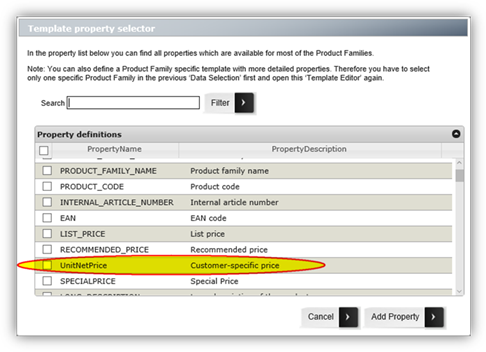
- Your customer code is not enabled for pricing ( in this case the relevant fields will not appear in the property list. For example, the UNIT_NET_Price property will not be available)
- The supplier did not provide pricing for that product
Products remain in the export even if no customer price is available.
Before You Export
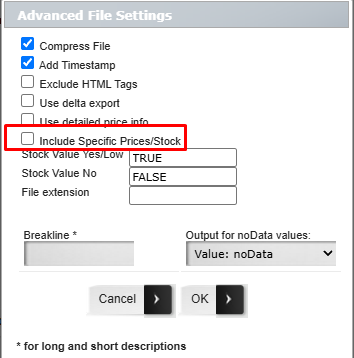
To retrieve customer-specific prices from the supplier, you must enable the Include Specific Prices/Stock option in the Advanced File Settings of your export profile.
Important
The Include Specific Prices/Stock option is required whenever you want to retrieve:
-
Customer-specific prices
-
Product availability
If this option is not enabled, Content Hub will not request this information from the supplier, even if your customer code has been authorised.
XML Export Formats
For XML-based exports, no additional field selection is required.
Once Include Specific Prices/Stock is enabled and your customer code has been authorised, the customer price is automatically included in the export.
The customer price is exported in the following fields:
| Export Format | Field |
|---|---|
| TradeXML | UnitNetPrice |
| BMEcat / ETIM | PRODUCT_PRICE with price_type="net_customer" |
Excel & CSV Export Formats
Excel and CSV exports require a custom template.
After customer-specific prices have been enabled by the supplier:
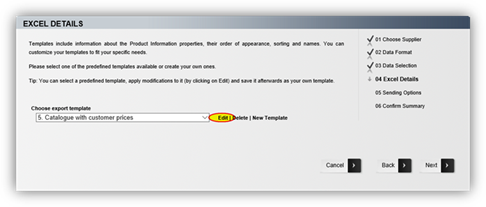
- Open your export profile.
- Edit or create a user template.
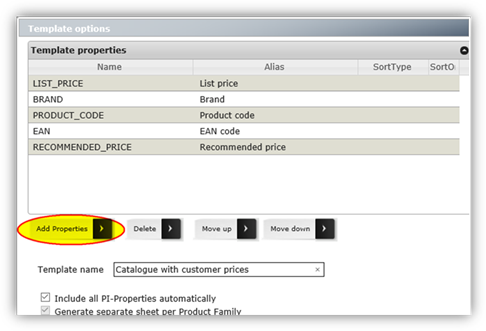
- Add the UnitNetPrice field.
- Save the template.
- Run the export.
If customer-specific prices are not available for the selected customer code, the UnitNetPrice column will still appear in the export but will contain no values.